Página 2 de 2
GUI
Enviado: 13 Set 2020 17:08
por Itamar M. Lins Jr.
Ola!
Pois é assim mesmo.
Antigamente eu usava font com tamanho 10, (800x600) VGA(TUBO) agora o padrão é font 16. LCD...
Aumenta resolução de tela, aumenta a fonte, aumenta a resolução dos icones, tamanho... Por isso o pessoal adotou como padrão a SVG, que está substituindo os .ico, .png... É um arquivo com XML dentro para redesenhar ele de acordo com a resolução. Os novos ambientes de janelas(KDE/Gnome) usam ele(SVG) como padrão.
Saudações,
Itamar M. Lins Jr.
GUI
Enviado: 13 Set 2020 17:08
por JoséQuintas
Explicando melhor:
Meu Windows está com ampliação de 150%.
Ao usar um programa 1920 x 1080, ele é ampliado em 50%, vai pra uns 2500 x 1500.
Isso só dá certo pra ampliação.
GUI
Enviado: 13 Set 2020 17:13
por Itamar M. Lins Jr.
Ola!
Já o contrário, redução, aí bagunça tudo mesmo
A tela MAIN eu uso assim.
Mas as DIALOG's uso limitado 1280x660 o mínimo com os objetos ancorados se o monitor tiver uma maior resolução.
ANCORE os objetos ai que vai entender.
Saudações,
Itamar M. Lins Jr.
GUI
Enviado: 13 Set 2020 17:15
por JoséQuintas
Itamar M. Lins Jr. escreveu:ANCORE os objetos ai que vai entender.
Até imagino o que seja, algo parecido com MaxRow()
Vai aumentar o browse, se tiver mais espaço.
GUI
Enviado: 13 Set 2020 17:17
por Itamar M. Lins Jr.
Ola!
guilib.ch
Código: Selecionar todos
#define ANCHOR_TOPLEFT         0   // Anchors control to the top and left borders of the container and does not change the distance between the top and left borders. (Default)
#define ANCHOR_TOPABS          1   // Anchors control to top border of container and does not change the distance between the top border.
#define ANCHOR_LEFTABS         2   // Anchors control to left border of container and does not change the distance between the left border.
#define ANCHOR_BOTTOMABS       4   // Anchors control to bottom border of container and does not change the distance between the bottom border.
#define ANCHOR_RIGHTABS        8   // Anchors control to right border of container and does not change the distance between the right border.
#define ANCHOR_TOPREL          16  // Anchors control to top border of container and maintains relative distance between the top border.
#define ANCHOR_LEFTREL         32  // Anchors control to left border of container and maintains relative distance between the left border.
#define ANCHOR_BOTTOMREL       64  // Anchors control to bottom border of container and maintains relative distance between the bottom border.
#define ANCHOR_RIGHTREL        128 // Anchors control to right border of container and maintains relative distance between the right border.
#define ANCHOR_HORFIX          256 // Anchors center of control relative to left and right borders but remains fixed in size.
#define ANCHOR_VERTFIX         512 // Anchors center of control relative to top and bottom borders but remains fixed in size.
Pode usar somado os valores ANCHOR_TOPABS+ANCHOR_LEFTABS...
Saudações,
Itamar M. Lins Jr.
GUI
Enviado: 13 Set 2020 17:29
por Itamar M. Lins Jr.
Ola!
Por exemplo, o que faz o controle(objeto) TOP PANEL ficar grudado lá em cima é a ANCORA.
Código: Selecionar todos
#xcommand ADD TOP PANEL [ <oPanel> ] TO <oWnd> ;
            [ ID <nId> ]               ;
            HEIGHT <height>            ;
            [ BACKCOLOR <bcolor> ]     ;
            [ HSTYLE <oStyle> ]        ;
            [ ON INIT <bInit> ]        ;
            [ ON PAINT <bDraw> ]       ;
            [ STYLE <nStyle> ]         ;
          => ;
    [<oPanel> :=] HPanel():New( <oWnd>,<nId>,<nStyle>,0,0,<oWnd>:nWidth,<height>,<bInit>,ANCHOR_TOPABS+ANCHOR_LEFTABS+ANCHOR_RIGHTABS,<bDraw>,<bcolor>,<oStyle> );
    [; hwg_SetCtrlName( <oPanel>,<(oPanel)> )]
Saudações,
Itamar M. Lins Jr.
GUI
Enviado: 13 Set 2020 19:35
por asimoes
Quintas
Um exemplo feito na Minigui Versão atual
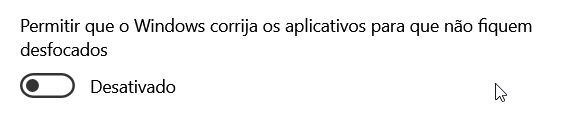
O meu está ativado, mas...
A grid deveria mostrar os 16 registros, deveria mostar até o 404, com resolução mais baixa, mostra
GUI
Enviado: 13 Set 2020 19:41
por asimoes
GUI
Enviado: 13 Set 2020 19:54
por asimoes
- 2020-09-13 19_51_27-Window.png (5.44 KiB) Exibido 2216 vezes
Desativei com a resolução 1920 x 1080 parece que ficou normal, maluquices do windows