Página 5 de 6
Hwgui em 64bits
Enviado: 17 Mai 2020 15:00
por asimoes
Itamar,
Só para informar, HBSSL funcionando!, FREEIMAGE, gerou as 2 libs, uma é de importação da DLL, vou fazer uns testes para ver se está ok a freeimage, o interessante com a HBSSL É QUE NÃO PRECISA DAS DLL´S na pasta do executável, muito bom saber disso.
Hwgui em 64bits
Enviado: 17 Mai 2020 15:15
por asimoes
Ops, ainda tem um problema.
Quando eu faço a compilação de um programa de teste, dá esse erro muito estranho:
Só executa o programa sem erro usando -run
set path=\HB32GCC64\bin;\HB32GCC64\comp\mingw64\bin;
hbmk2 BROWSECOLOR.hbp -jobs=1 -rebuild -run
Se eu remover o -run ou executando direto o programa
Acontece isso:
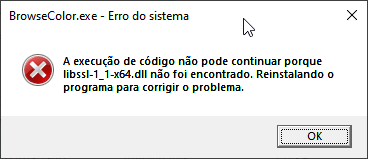
- 2020-05-17 15_11_27-BrowseColor.exe - Erro do sistema.png (6.71 KiB) Exibido 8362 vezes

- 2020-05-17 15_11_17-BrowseColor.exe - Erro do sistema.png (6.88 KiB) Exibido 8362 vezes
Hwgui em 64bits
Enviado: 17 Mai 2020 16:14
por Itamar M. Lins Jr.
Ola!
E precisa desta lib ?
Eu entendi.
o hbmk2 com -run pega na pasta bin a dll
Mas vc está linkando ela sem ser estatica usando dll, veja ai o .hbp seu.
Saudações,
Itamar M. Lins Jr.
Hwgui em 64bits
Enviado: 17 Mai 2020 16:20
por Itamar M. Lins Jr.
Ola!
Meu .hbp tem isso.
Saudações,
Itamar M. Lins Jr.
Hwgui em 64bits
Enviado: 17 Mai 2020 17:03
por asimoes
Itamar M. Lins Jr. escreveu:Ola!
Assim funcionou,obrigado, nunca usei assim no harbour 3.4
Hwgui em 64bits
Enviado: 17 Mai 2020 17:12
por asimoes
Agora
O status dessa compilação do harbour 3.2 64 bits.
Libs que eu preciso:
HBSSL -> OK
FREEIMAGE
Preciso verificar porque não funciona:
@ 0, 0 IMAGE oSayMain SHOW "asa-logo-1.png" OF oDlg SIZE 965, 500
Isso funciona:
Código: Selecionar todos
  Fi_Initialise()

   nHandleFile := Fi_Load( FIF_JPEG, cImagem, JPEG_DEFAULT )

   nWidthImg   := Fi_GetWidth( nHandleFile )

   nHeightImg  := Fi_GetHeight( nHandleFile )

   Fi_DeInitialise()
Hwgui em 64bits
Enviado: 17 Mai 2020 18:14
por marcosgambeta
Ainda com respeito ao MSYS2, pode-se instalar grupos de arquivos no lugar de arquivos individuais. Uma lista está disponível no link abaixo:
https://packages.msys2.org/group/
Instalando grupos de arquivos, fica mais fácil preparar o ambiente de desenvolvimento.
Arquivos presentes no grupo mingw-w64-i686-toolchain:
Código: Selecionar todos
Grupo: mingw-w64-i686-toolchain

    mingw-w64-i686-binutils
    mingw-w64-i686-crt-git
    mingw-w64-i686-gcc
    mingw-w64-i686-gcc-ada
    mingw-w64-i686-gcc-fortran
    mingw-w64-i686-gcc-libgfortran
    mingw-w64-i686-gcc-libs
    mingw-w64-i686-gcc-objc
    mingw-w64-i686-gdb
    mingw-w64-i686-headers-git
    mingw-w64-i686-libmangle-git
    mingw-w64-i686-make
    mingw-w64-i686-pkg-config
    mingw-w64-i686-tools-git
    mingw-w64-i686-libwinpthread-git
    mingw-w64-i686-winpthreads-git
    mingw-w64-i686-winstorecompat-git

Comando:
  pacman -S mingw-w64-i686-toolchain
Arquivos presentes no grupo mingw-w64-x86_64-toolchain:
Código: Selecionar todos
Grupo: mingw-w64-x86_64-toolchain

    mingw-w64-x86_64-binutils
    mingw-w64-x86_64-crt-git
    mingw-w64-x86_64-gcc
    mingw-w64-x86_64-gcc-ada
    mingw-w64-x86_64-gcc-fortran
    mingw-w64-x86_64-gcc-libgfortran
    mingw-w64-x86_64-gcc-libs
    mingw-w64-x86_64-gcc-objc
    mingw-w64-x86_64-gdb
    mingw-w64-x86_64-headers-git
    mingw-w64-x86_64-libmangle-git
    mingw-w64-x86_64-make
    mingw-w64-x86_64-pkg-config
    mingw-w64-x86_64-tools-git
    mingw-w64-x86_64-libwinpthread-git
    mingw-w64-x86_64-winpthreads-git
    mingw-w64-x86_64-winstorecompat-git

Comando:
  pacman -S mingw-w64-x86_64-toolchain
Me desculpem se repeti algo já mencionado nas mensagens anteriores, mas o tópico já está com 5 páginas e ainda não deu tempo de ler tudo.
Hwgui em 64bits
Enviado: 17 Mai 2020 18:33
por Itamar M. Lins Jr.
Ola!
Código: Selecionar todos
@ 0, 0 IMAGE oSayMain SHOW "asa-logo-1.png" OF oDlg SIZE 965, 500
Não vi exemplo desse comando na pasta samples.
Tem um que usa bitmap.
Código: Selecionar todos
@ 30,10 BITMAP "..\image\astro.jpg" SIZE 100,90 TRANSPARENT ON CLICK {||hwg_MsgInfo("onclick")}
Saudações,
Itamar M. Lins Jr.
Hwgui em 64bits
Enviado: 17 Mai 2020 19:05
por Itamar M. Lins Jr.
Ola!
Achei o fio da meada aqui... estou olhando o código no hb34.
Tem isso no \contrib\hbfimage
HB_STATIC_FREEIMAGE
O Harbour 3.4 tem muitas melhorias que não tem no HB32. Pena que parou!
Saudações,
Itamar M. Lins Jr.
Hwgui em 64bits
Enviado: 17 Mai 2020 19:39
por Itamar M. Lins Jr.
Ola!
Tô aqui, aprendendo a pulso rsrsrs
A Hwgui quando usa a freeimage usa com DLL.
Então no Harbour 32 ou 34 está ok não tem mais nada para fazer acredito.
Saudações,
Itamar M. Lins Jr.
Hwgui em 64bits
Enviado: 18 Mai 2020 16:35
por Fernando queiroz
Alguem da uma dica, ja baixei a openssl-1.1.1g-win64-mingw
apos isso tem de instalar ou compilar???
coloquei no meu ambiente como abaixo
Código: Selecionar todos
set path=C:\HB64\bin\win\mingw64;C:\msys64\mingw64\bin;%path%
set HB_COMPILER=mingw64
SET HB_PATH=c:\hb64
SET HB_INSTALL_PREFIX=c:\hb64
SET HB_STATIC_CURL=yes
SET HB_STATIC_OPENSSL=yes
SET HB_WITH_CURL=C:\curl-7.70.0-win64-mingw\include
SET HB_WITH_FREEIMAGE=C:\FreeImage\Dist\x64
SET HB_WITH_MYSQL=C:\mysql-8.0.19-winx64\include
SET HB_WITH_OPENSSL=C:\openssl-1.1.1g-win64-mingw\include
no .HBP de um app tenho
Código: Selecionar todos
-oSSGC
-m
-n
-es2
-w3
-compr
-quiet
-mt
{win}-fullstatic
-inc
-jobs=2

C:\HB64\contrib\hbssl\hbssl.hbc
c:\hwgui\hwgui.hbc
C:\LetoDBf-master\letodb.hbc

SSGC.PRG
email.prg
ssgc.rc
quando compilo da o seguinte erro
Código: Selecionar todos
C:\SGCMARIADB\SGCHB>HBMK2 SSGC.HBP
hbmk2: Processing environment options: -comp=mingw64
hbmk2: Triggered by #require directive: hbssl.hbc
hbmk2: Triggered by #require directive: hbtip.hbc
C:/msys64/mingw64/bin/../lib/gcc/x86_64-w64-mingw32/10.1.0/../../../../x86_64-w64-mingw32/bin/ld.exe: skipping incompatible c:/hwgui/lib\libhbactivex.a when searching for -lhbactivex
C:/msys64/mingw64/bin/../lib/gcc/x86_64-w64-mingw32/10.1.0/../../../../x86_64-w64-mingw32/bin/ld.exe: cannot find -lhbactivex
C:/msys64/mingw64/bin/../lib/gcc/x86_64-w64-mingw32/10.1.0/../../../../x86_64-w64-mingw32/bin/ld.exe: cannot find -lrddleto
collect2.exe: error: ld returned 1 exit status
hbmk2[SSGC]: Error: Running linker. 1
alguma dica

Hwgui em 64bits
Enviado: 18 Mai 2020 16:44
por Itamar M. Lins Jr.
Ola!
Ai que está o X lá da questão levantada do "bate papo"
Quer aprender a pescar ou quer o peixe ?
Poderia subir aqui para vc as libs já compiladas, mas vc ficaria dependente de mim.
Como eu disse, primeiro vc deve baixar tudo antes.
E colocar(setar) onde o hbmk2 vai achar as DLL para exportar a lib .a
A FreeImage para Hwgui esquece. Pq só vai com DLL, mesmo linkando estática.
O LetoDbf vc tem os fontes ?
Basta recompilar.
A Hwgui tem os fontes ?
Saudações,
Itamar M. Lins Jr.
Hwgui em 64bits
Enviado: 18 Mai 2020 17:12
por Fernando queiroz
Itamar M. Lins Jr. escreveu:Ola!
Ai que está o X lá da questão levantada do "bate papo"
Quer aprender a pescar ou quer o peixe ?
Poderia subir aqui para vc as libs já compiladas, mas vc ficaria dependente de mim.
Como eu disse, primeiro vc deve baixar tudo antes.
E colocar(setar) onde o hbmk2 vai achar as DLL para exportar a lib .a
A FreeImage para Hwgui esquece. Pq só vai com DLL, mesmo linkando estática.
O LetoDbf vc tem os fontes ?
Basta recompilar.
A Hwgui tem os fontes ?
Saudações,
Itamar M. Lins Jr.
Como disse antes quero aprender a pescar
mas vamos la
HARBOUR compilado OK
HWGUI compilada OK
LETODBF compilado OK
SEFAZCLASS criada a lib/compilada OK
openssl-1.1.1g-win64-mingw ( o que fazer ?? tem de instalar ?? )
curl-7.70.0-win64-mingw ( a mesma coisa, )
Hwgui em 64bits
Enviado: 18 Mai 2020 17:47
por Itamar M. Lins Jr.
Ola!
openssl-1.1.1g-win64-mingw ( o que fazer ?? tem de instalar ?? )
curl-7.70.0-win64-mingw ( a mesma coisa, )
Esse dois a LIB é extraída da DLL são dois arquivos .a
Código: Selecionar todos
>set hb
HB_STATIC_OPENSSL=yes
HB_STATIC_CURL=yes
HB_WITH_CURL=C:\curl-7.70.0-win64-mingw\include
HB_WITH_OPENSSL=C:\openssl-1.1.1g-win64-mingw\include
Basta entrar na pasta do Harbour 3.2. ATENÇÃO que é na pasta dos FONTES do Harbour não compilado!
hbmk2 hbcurl.hbp
Código: Selecionar todos
C:\devl\hb32-code\contrib\hbcurl>hbmk2 hbcurl.hbp
hbmk2: Gerando sub-projeto (passo 2): hbcurls.hbp
hbmk2: Dependência 'curl' encontrado: C:\curl-7.70.0-win64-mingw\include
hbmk2: Harbour: Compilando módulos...
Harbour 3.2.0dev (r2004201301)
Copyright (c) 1999-2020, https://harbour.github.io/
Compiling 'hbcurl.hbx'...
Lines 50, Functions/Procedures 1
Generating C source output to '.hbmk\win\mingw64\hbcurls\hbcurl.c'... Done.
hbmk2: Compilando...
In file included from C:/curl-7.70.0-win64-mingw/include/curl/curl.h:2888,
                 from ../../../../core.c:49:
../../../../core.c: In function 'HB_FUN_CURL_EASY_GETINFO':
C:/curl-7.70.0-win64-mingw/include/curl/typecheck-gcc.h:137:13: warning: call to '_curl_easy_getinfo_err_curl_certinfo' declared with attribute warning: curl_easy_getinfo expects a pointer to 'struct curl_certinfo *' for this info [-Wattribute-warning]
  137 |             _curl_easy_getinfo_err_curl_certinfo();                     \
      |             ^~~~~~~~~~~~~~~~~~~~~~~~~~~~~~~~~~~~~~
C:/curl-7.70.0-win64-mingw/include/curl/typecheck-gcc.h:137:13: note: in definition of macro 'curl_easy_getinfo'
  137 |             _curl_easy_getinfo_err_curl_certinfo();                     \
      |             ^~~~~~~~~~~~~~~~~~~~~~~~~~~~~~~~~~~~
../../../../core.c:1975:19: note: in expansion of macro 'HB_CURL_EASY_GETINFO'
 1975 |             res = HB_CURL_EASY_GETINFO( hb_curl, CURLINFO_CERTINFO, &ret_slist );
      |                   ^~~~~~~~~~~~~~~~~~~~
hbmk2: Criando biblioteca estáticas... libhbcurls.a
hbmk2: Dependência 'curl' encontrado: C:\curl-7.70.0-win64-mingw\include
hbmk2[hbcurl]: Atenção: Não foram encontrados fontes para biblioteca de
               importação.
hbmk2: Harbour: Compilando módulos...
Harbour 3.2.0dev (r2004201301)
Copyright (c) 1999-2020, https://harbour.github.io/
Compiling 'hbcurl.hbx'...
Lines 50, Functions/Procedures 1
Generating C source output to '.hbmk\win\mingw64\hbcurl\hbcurl.c'... Done.
hbmk2: Compilando...
In file included from C:/curl-7.70.0-win64-mingw/include/curl/curl.h:2888,
                 from ../../../../core.c:49:
../../../../core.c: In function 'HB_FUN_CURL_EASY_GETINFO':
C:/curl-7.70.0-win64-mingw/include/curl/typecheck-gcc.h:137:13: warning: call to '_curl_easy_getinfo_err_curl_certinfo' declared with attribute warning: curl_easy_getinfo expects a pointer to 'struct curl_certinfo *' for this info [-Wattribute-warning]
  137 |             _curl_easy_getinfo_err_curl_certinfo();                     \
      |             ^~~~~~~~~~~~~~~~~~~~~~~~~~~~~~~~~~~~~~
C:/curl-7.70.0-win64-mingw/include/curl/typecheck-gcc.h:137:13: note: in definition of macro 'curl_easy_getinfo'
  137 |             _curl_easy_getinfo_err_curl_certinfo();                     \
      |             ^~~~~~~~~~~~~~~~~~~~~~~~~~~~~~~~~~~~
../../../../core.c:1975:19: note: in expansion of macro 'HB_CURL_EASY_GETINFO'
 1975 |             res = HB_CURL_EASY_GETINFO( hb_curl, CURLINFO_CERTINFO, &ret_slist );
      |                   ^~~~~~~~~~~~~~~~~~~~
hbmk2: Criando biblioteca estáticas... libhbcurl.a
Agora temos duas LIBS! a do Harbour e a que foi extraida da DLL.
Código: Selecionar todos
C:\devl\hb32-code\contrib\hbcurl>dir
 Pasta de C:\devl\hb32-code\contrib\hbcurl

18/05/2020  17:42    <DIR>          .
18/05/2020  17:42    <DIR>          ..
12/05/2020  00:53            81.467 core.c
12/05/2020  00:53            32.373 hbcurl.ch
12/05/2020  00:53               504 hbcurl.hbc
12/05/2020  00:53               272 hbcurl.hbm
12/05/2020  00:53               275 hbcurl.hbp
12/05/2020  00:53             1.529 hbcurl.hbx
12/05/2020  00:53                63 hbcurls.hbp
18/05/2020  17:42            51.764 libhbcurl.a
18/05/2020  17:42            51.610 libhbcurls.a
12/05/2020  00:53    <DIR>          tests
               9 arquivo(s)        219.857 bytes
               3 pasta(s)   200.336.076.800 bytes disponíveis

C:\devl\hb32-code\contrib\hbcurl>
Basta copiar\mover as libs a pasta do harbour. No meu aqui é: c:\hb32
Código: Selecionar todos
C:\devl\hb32-code\contrib\hbcurl>move *.a \HB32\lib\win\mingw64
Mesmo procedimento para a OpenSSL.
Saudações,
Itamar M. Lins Jr.
Hwgui em 64bits
Enviado: 18 Mai 2020 17:51
por Fernando queiroz
bom deu uma melhorada agora
Código: Selecionar todos
C:\SGCMARIADB\SGCHB>hbmk2 ssgc.hbp
hbmk2: Processing environment options: -comp=mingw64
hbmk2: Triggered by #require directive: hbssl.hbc
hbmk2: Triggered by #require directive: hbtip.hbc
C:/msys64/mingw64/bin/../lib/gcc/x86_64-w64-mingw32/10.1.0/../../../../x86_64-w64-mingw32/bin/ld.exe: cannot find -lrddleto
collect2.exe: error: ld returned 1 exit status
hbmk2[ssgc]: Error: Running linker. 1
recompilei o LETODBF mas ele nao encontra
MEU .HBP esta assim, o que sera que falta??
Código: Selecionar todos
-oSSGC
-m
-n
-es2
-w3
-compr
-quiet
-mt
{win}-fullstatic
-inc
-jobs=2

c:\hwgui\hwgui.hbc
C:\LetoDBf-master\letodb.hbc

SSGC.PRG
email.prg
ssgc.rc