Página 1 de 1

Criando Gráficos de Pesquiisa

Enviado: 16 Abr 2025 07:22
por Jorge Luiz
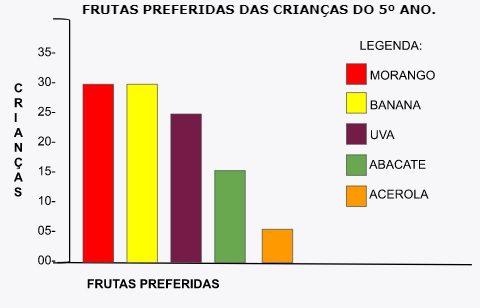
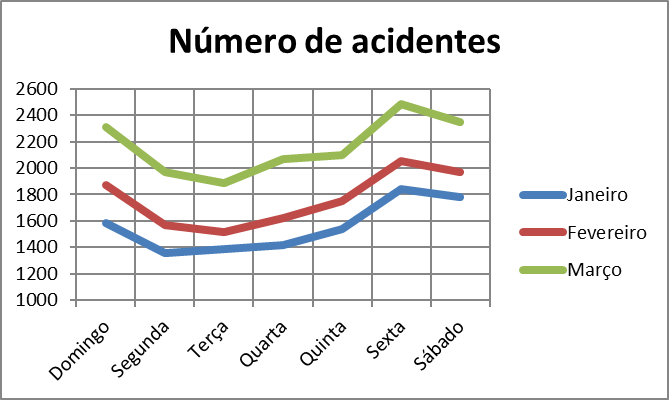
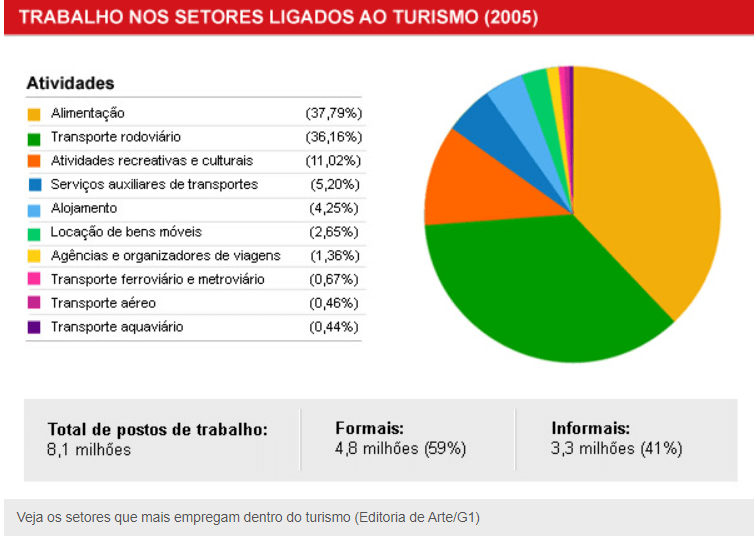
Queria saber como criar gráficos como: pizza, torres, pirâmides...

No Harbour

Assim como a foto abaixo
Imagem
Imagem
Imagem

Criando Gráficos de Pesquiisa

Enviado: 16 Abr 2025 08:41
por Itamar M. Lins Jr.
Olá!
https://pctoledo.org/forum/viewto ... rt#p127287
Melhor que tem para 32 bits minha opinião.
Usei por muito tempo infelizmente não sei como usar em 64 bits.
Agora uso a do Google. Precisa de internet para acessar a API do Google.(nem tudo são flores)

Código: Selecionar todos

************************************************************
PROCEDURE GRAFICO_Google( cColunas, cTitulo, cLegenda, cArq)
************************************************************
*
*
LOCAL cHTML, nI, nJ, xVALOR, nHan , cEOL:=hb_eol(), cStdOut, cStdErr
Private cTexto :=  cLegenda //Precisa de ser private para usar & dentro de -> TEXT TO VAR

Text TO VAR cHTML
<!DOCTYPE html>
<html>
<head>
  <script src="https://www.gstatic.com/charts/loader.js"></script>
  <script>
    google.charts.load('current', {packages: ['corechart'], 'language': 'pt-BR'});
    google.charts.setOnLoadCallback(drawChart);

    function drawChart() {
      // Define the chart to be drawn.
      var data = new google.visualization.arrayToDataTable([
      ["Element","Total", { role: "style"}],
       xColunas ])
       
      var view = new google.visualization.DataView(data);
      view.setColumns([0, 1,
                       { calc: "stringify",
                         sourceColumn: 1,
                         type: "string",
                         role: "annotation" },
                       2]);
      var options = {
        title: "xTitulo" ,
        width: 1300,
        height: 600,
        is3D: true,
        bar: {groupWidth: "95%"},
        legend: { position: "none" },
      };

      // Instantiate and draw the chart.
      var chart = new google.visualization.ColumnChart(document.getElementById('myColumnChart'));
      chart.draw(view, options);
      //chart.draw(data, {width: 1024, height: 640, is3D: true, title: 'xTitulo' });
    }
  </script>
</head>
<body>

&cTexto
<!-- Identify where the chart should be drawn. -->
<div id="myColumnChart"/>
  
</body>
ENDTEXT
cHTML := StrTran(cHtml,'xColunas',cColunas)
cHTML := StrTran(cHtml,'xTitulo',cTitulo)
cHtml += '</html>' 

nHan := FCREATE( cARQ )          
FWRITE ( nHan , cHTML , LEN( cHTML ) )
FCLOSE( nHan )

#ifdef __PLATFORM__WINDOWS
   hwg_ShellExecute(cArq,"open",nil,cDirSist,1)
#else
   hb_processRun( 'open ' + cArq,,@cStdOut,@cStdErr,.T. )
#endif

   IF !Empty(cStdOut)
      hwg_msgstop(cStdOut)
   ENDIF
   IF !Empty(cStdErr)
      hwg_msgstop(cStdErr)
   ENDIF
//__RUN( "START EXPLORER " + cArq )
RETURN .T.

FUNCTION printchart
RETURN NIL
   
FUNCTION grafico
/*----------------------------------------------------------------------*/

*************************************************************
FUNCTION Pie_Chart(cPedacos, cTitulo, cLegenda, cArq, aLinha)
*************************************************************
*
*
LOCAL cHtml, nHan, cLinha := ""
hb_default(@aLinha,{})
Text TO VAR cHTML
<html>
  <head>
    <script type="text/javascript" src="https://www.gstatic.com/charts/loader.js"></script>
    <script type="text/javascript">
      google.charts.load("current", {packages:["corechart"]});
      google.charts.setOnLoadCallback(drawChart);
      function drawChart() {
        var data = google.visualization.arrayToDataTable([
          xPedacos
        ]);

        var options = {
          title: xTitulo,
          is3D: true,
        };

        var chart = new google.visualization.PieChart(document.getElementById('piechart_3d'));
        chart.draw(data, options);
      }
    </script>
  </head>
  <body>
    <div id="piechart_3d" style="width: 1200px; height: 550px;"></div>
     xLinha
  </body>
</html>
ENDTEXT

FOR nL := 1 TO Len(aLinha)
   cLinha += aLinha[nL]
NEXT

cHTML := StrTran(cHtml,'xPedacos',cPedacos) 
cHTML := StrTran(cHtml,'xTitulo',cTitulo)
cHtml := StrTran(cHtml,'xLinha',cLinha)

cHtml += '</html>'

//HWG_MSGINFO(cArq)
hb_MemoWrit(cArq,cHtml)
//nHan := FCREATE( cARQ )          
//FWRITE ( nHan , cHTML , LEN( cHTML ) )
//FCLOSE( nHan )
//__RUN( "START EXPLORER " + cArq )
hwg_Shellexecute(cArq,"open",,cDirSist,1)   
2025-04-16_08-54-07.png
Quando o mouse passa por cima de uma fatia, aparece umas mensagens balão. Tem muitas opções e exemplos na internet.
Sim visualiza pelo navegador e gera em PDF/imprime.
https://www-w3schools-com.translate.goo ... _tr_pto=tc

Usem HTML o céu é o limite!
Não tem dono, não muda, tem compatibilidade com versões antigas.

Saudações,
Itamar M. Lins Jr.

Criando Gráficos de Pesquiisa

Enviado: 19 Abr 2025 08:51
por Jorge Luiz
Deu esse erro no código

hbmk2 teste.prg
Harbour 3.2.0dev (r2307062207)
Copyright (c) 1999-2021, https://harbour.github.io/
Compiling 'teste.prg'...
teste.prg(9) Error E0030 Syntax error "syntax error at 'TO'"
teste.prg(10) Error E0030 Syntax error "syntax error at '<'"
teste.prg(11) Error E0030 Syntax error "syntax error at '<'"
teste.prg(12) Error E0030 Syntax error "syntax error at '<'"
teste.prg(13) Error E0030 Syntax error "syntax error at '<'"
teste.prg(14) Error E0030 Syntax error "syntax error at '<'"
teste.prg(17) Error E0030 Syntax error "syntax error at '.'"
teste.prg(18) Error E0030 Syntax error "syntax error at '{'"
teste.prg(20) Error E0030 Syntax error "syntax error at 'DATA'"
teste.prg(21) Error E0030 Syntax error "syntax error at ','"
teste.prg(22) Error E0030 Syntax error "syntax error at ']'"
teste.prg(25) Error E0030 Syntax error "syntax error at 'VIEW'"
teste.prg(26) Error E0030 Syntax error "syntax error at 'stringify'"
teste.prg(27) Error E0030 Syntax error "syntax error at '1'"
teste.prg(28) Error E0030 Syntax error "syntax error at 'string'"
teste.prg(29) Error E0030 Syntax error "syntax error at 'annotation'"
teste.prg(31) Error E0030 Syntax error "syntax error at ']'"
teste.prg(32) Error E0030 Syntax error "syntax error at 'xTitulo'"
teste.prg(33) Error E0030 Syntax error "syntax error at '1300'"
teste.prg(34) Error E0030 Syntax error "syntax error at '600'"
teste.prg(35) Error E0030 Syntax error "syntax error at ','"
teste.prg(36) Error E0030 Syntax error "syntax error at '{'"
teste.prg(37) Error E0030 Syntax error "syntax error at '{'"
teste.prg(39) Error E0030 Syntax error "syntax error at '}'"
teste.prg(43) Error E0030 Syntax error "syntax error at 'CHART'"
teste.prg(44) Error E0030 Syntax error "syntax error at '}'"
teste.prg(45) Error E0030 Syntax error "syntax error at '<'"
teste.prg(46) Error E0030 Syntax error "syntax error at '<'"
teste.prg(47) Error E0030 Syntax error "syntax error at '<'"
teste.prg(50) Error E0030 Syntax error "syntax error at '<'"
teste.prg(51) Error E0030 Syntax error "syntax error at '<'"
teste.prg(53) Error E0030 Syntax error "syntax error at '<'"
teste.prg(54) Error E0020 Incomplete statement or unbalanced delimiters
teste.prg(91) Error E0030 Syntax error "syntax error at 'TO'"
teste.prg(92) Error E0030 Syntax error "syntax error at '<'"
teste.prg(93) Error E0030 Syntax error "syntax error at '<'"
teste.prg(94) Error E0030 Syntax error "syntax error at '<'"
teste.prg(95) Error E0030 Syntax error "syntax error at '<'"
teste.prg(98) Error E0030 Syntax error "syntax error at '.'"
teste.prg(99) Error E0030 Syntax error "syntax error at 'DATA'"
teste.prg(100) Error E0020 Incomplete statement or unbalanced delimiters
teste.prg(102) Error E0030 Syntax error "syntax error at ']'"
teste.prg(103) Error E0030 Syntax error "syntax error at 'OPTIONS'"
teste.prg(104) Error E0030 Syntax error "syntax error at ','"
teste.prg(105) Error E0030 Syntax error "syntax error at ','"
teste.prg(107) Error E0030 Syntax error "syntax error at '}'"
teste.prg(110) Error E0030 Syntax error "syntax error at 'CHART'"
teste.prg(111) Error E0030 Syntax error "syntax error at '<'"
teste.prg(112) Error E0030 Syntax error "syntax error at '<'"
teste.prg(113) Error E0030 Syntax error "syntax error at '<'"
teste.prg(114) Error E0030 Syntax error "syntax error at '<'"
teste.prg(115) Error E0020 Incomplete statement or unbalanced delimiters
teste.prg(116) Error E0030 Syntax error "syntax error at '<'"
teste.prg(117) Error E0030 Syntax error "syntax error at '<'"
teste.prg(118) Error E0020 Incomplete statement or unbalanced delimiters
55 errors

Criando Gráficos de Pesquiisa

Enviado: 19 Abr 2025 09:29
por alxsts
Olá!

TEXT TO é um pseudo-comando, criado através do uso do pré-processador.

No código mostrado ele não foi criado. Coloque o código abaixo no início do teu arquivo.Teste.Prg:

Código: Selecionar todos

/* TEXT TO <varname> */
#xcommand TEXT TO <v> => #pragma __text|<v>+=%s+hb_eol();<v>:=""

Criando Gráficos de Pesquiisa

Enviado: 19 Abr 2025 15:31
por Jorge Luiz
Deu esse novo erro aqui!

hbmk2 teste.prg
Harbour 3.2.0dev (r2307062207)
Copyright (c) 1999-2021, https://harbour.github.io/
Compiling 'teste.prg'...
Lines 141, Functions/Procedures 4
Generating C source output to 'C:\Users\jas58\AppData\Local\Temp\hbmk_rlpy6i.dir\teste.c'... Done.
C:/Users/jas58/AppData/Local/Temp/hbmk_rlpy6i.dir/teste.o:teste.c:(.data+0x98): undefined reference to `HB_FUN_HWG_SHELLEXECUTE'
C:/Users/jas58/AppData/Local/Temp/hbmk_rlpy6i.dir/teste.o:teste.c:(.data+0x128): undefined reference to `HB_FUN_HWG_MSGSTOP'
collect2.exe: error: ld returned 1 exit status
hbmk2: Erro: Executando linkeditor. 1
C:\hb32\comp\mingw\bin\gcc.exe C:/Users/jas58/AppData/Local/Temp/hbmk_rlpy6i.dir/teste.o C:/Users/jas58/AppData/Local/Temp/hbmk_rlpy6i.dir/hbmk_9lmzau.o -mconsole -Wl,--start-group -lhbextern -lhbdebug -lhbvm -lhbrtl -lhblang -lhbcpage -lgtcgi -lgtpca -lgtstd -lgtwin -lgtwvt -lgtgui -lhbrdd -lhbuddall -lhbusrrdd -lrddntx -lrddcdx -lrddnsx -lrddfpt -lhbrdd -lhbhsx -lhbsix -lhbmacro -lhbcplr -lhbpp -lhbcommon -lhbmainstd -lwinmm -lkernel32 -luser32 -lgdi32 -ladvapi32 -lws2_32 -liphlpapi -lwinspool -lcomctl32 -lcomdlg32 -lshell32 -luuid -lole32 -loleaut32 -lmpr -lmapi32 -limm32 -lmsimg32 -lwininet -lhbpcre -lhbzlib -Wl,--end-group -oteste.exe -LC:/hb32/lib/win/mingw

hbmk2: Erro: Referenciado, faltando, mas funções desconhecida(s):
HWG_SHELLEXECUTE(), HWG_MSGSTOP()

Criando Gráficos de Pesquiisa

Enviado: 19 Abr 2025 15:46
por Itamar M. Lins Jr.
Olá!
Sim, mas cadê o seu código ?
Esses dai basta trocar por hwg_msgstop() por alert() e HWG_SHELLEXECUTE() por __run() ou hb_processRun( 'open ' + cArq,,@cStdOut,@cStdErr,.T. )
Como vc está usando a função ?

Não vai acontecer nada se vc está só compilando a função pura.

Saudações,
Itamar M. Lins Jr.