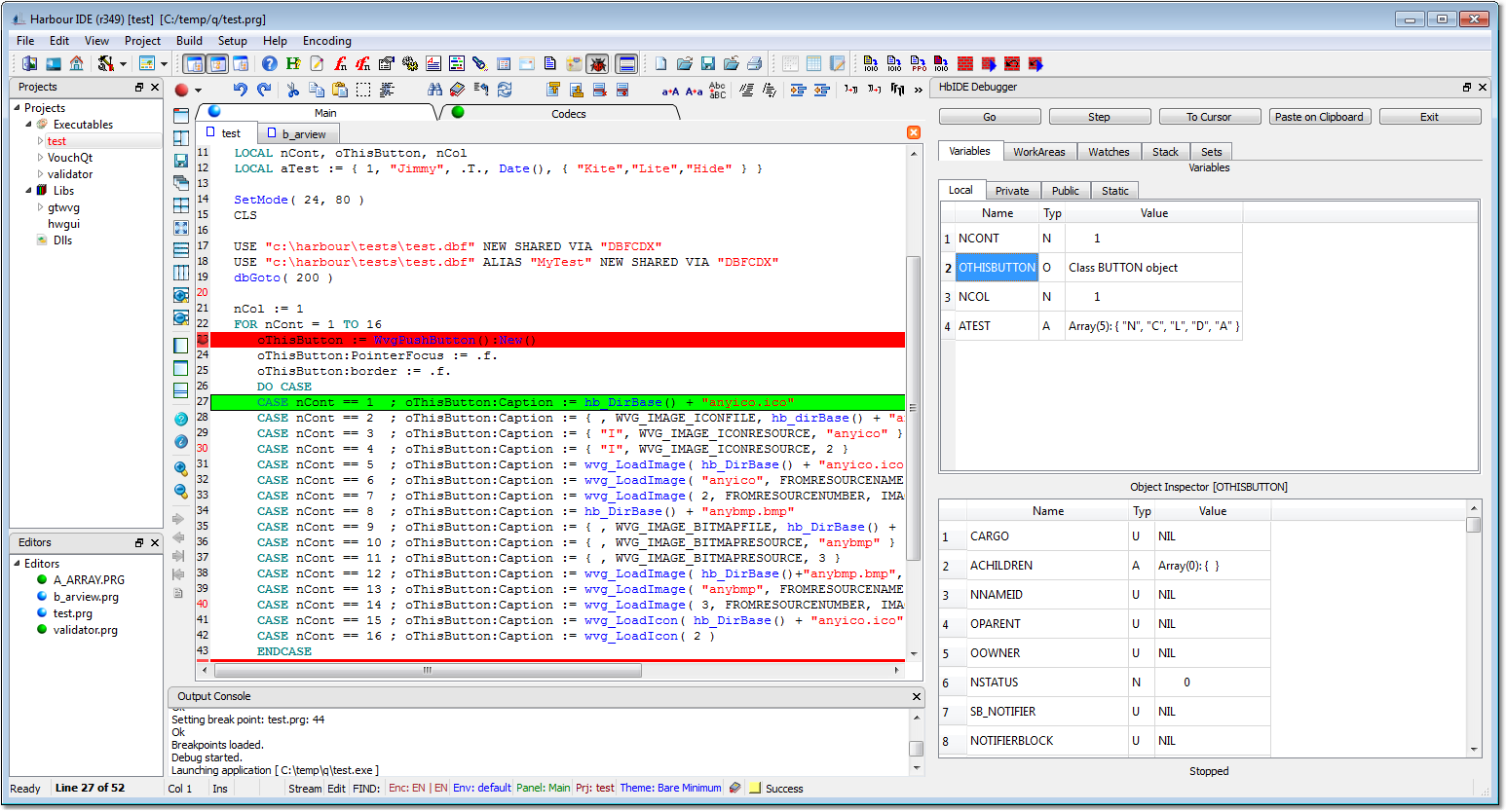
2014-08-31 10:00 UTC-0800 Pritpal Bedi (bedipritpal at hotmail.com)(r342)
  * qtcontribs.hbp
    + Added: debug/hwgdebug.hbp

  + debug
  + debug/dbgconnect.prg
  + debug/dbgdop.c
  + debug/debugger.prg
  + debug/hwgdebug.hbp
    + Added: Alexander Kresin's <alex@kresin.ru> application-side debugger
       library. Many thanks Kresin. You fittingly separated the rectangular
       and non-rectangular code of Harbour's native debugger.
       I added some missing features which were added to Harbour debugger,
       probably, later than Kresin wrote his library.

  + hbide/debugger.prg
  + hbide/debugger.ui
  + hbide/resources/debugger.png
    + Added: Alex <alexeyzapolskiy@gmail.com> written HbIDE specific bridge
       for HWGDebug defined protocol. It was a mammoth work. Thanks Alex.

  * hbide/actions.prg
  * hbide/docks.prg
  * hbide/editor.prg
  * hbide/hbide.hbp
  * hbide/hbide.qrc
  * hbide/main.prg
  * hbide/object.prg
  * hbide/projmanager.prg
  * hbide/saveload.prg
  * hbide/shortcuts.prg
    + Debbuger specific code parts. Mostly by Alex.

  * hbqt/qtgui/hbqt_version.ch
    % Version bump.

  * hbqt/qtgui/hbqtgui.ch
    + Added: few more constants.

  * hbqt/qtcore/hbqt.h
    + Added: MSVC specific defines. Proveded by M.Ronaldo, thanks.

  * hbqt/qtgui/qth/HBQPlainTextEdit.qth
  * hbqt/qtgui/hbqt_hbqplaintextedit.cpp
  * hbqt/qtgui/hbqt_hbqplaintextedit.h
    + Added: methods essential to integrate debugger protocol.
       Courtesy: Alex. I just changed the identifiers to confirm to
       HbIDE laid rules.

    Harbour's debugger is brought to HbIDE by Alex based on Kresin's
    communication layer which separates the user-interface from its core.
    This separation makes it possible to embbed this protocol in any
    GUI/Console environment and for any type of Harbour/xHarbour
    compiled application.

    PREREQUITES: ( for this version only. In future theme may change. )
      1. Compile QtContribs (recompile not needed). It will build
         hwgdebug library and will deposit in the folder with rest of
         the libraries.

      2. Spread sources belonging to the debugged project on same View.
         Only those sources where you want to put the break-points needs
         to be visible on the active view.

      3. Put the break-points by clicking on a line on Line-Numbers area
         of editing instance. Such click will toggle the break-point.
         The source line will turn RED if a break-point is installed.

      4. To be on the safer side, exit HbIDE and execute it again.
         All break-points you initiated in previous run will re-appear.

      5. Only build the project. Do not launch. Click on the "Debugger"
         icon on the main toolbar. A left-hand side docking debugger widget
         will appear. Resize it to suit your preferences.

      6. Click on "Build" menu on the main menu-bar then click on
         "Launch Debug". Application will be fired and will stop execution
         on first break-boint it will encounter. Debugger interface will
         show up data in its many widgets. Rest you all know how to operate
         the debugger.

      7. Here are some instructions specific to HbIDE interface:
         a. Double-click on any work-area entry will refresh "Current Record"
            displaying record information of clicked work-area.

         b. Double-click on any entry in "Variables" table will refresh the
            "Object Inspector" widget containing relevant information of
            clicked variable. Only variables of type (O)bject or (A)rray
            can be inspected this way. Currently array can be inspected
            for primary elements only. Sub-arrays values cannot be inspected.

         c. Click on "Add" button to intiate a new "Watch" and then
            double-click in "Expression" field. Punch-in or copy a Harbour
            expression and press <Enter>. Its current value will be
            reflected in "Value" field. You can add as many "Watches"
            as you like. To delete a watch first select the entry and then
            click on "Delete" button. Watches are not saved in current vesrion.

    ASSUMPTION: ( for current version only )
      1. Project file (.hbp), sources (.prg.c.cpp.hb), executable ({win}.exe)
         must reside in same folder.

      2. Project file (.hbp) must contain following entries:
           -b
           -lhwgdebug
           -lhbdebug

      3. Possessing some knowledge about Harbour debugger can greatly help
         you to understand the basics of debugger but certainly is not
         neccessary.

    Many more enhancements are planned for the final version. This is just the
    begining. The most important enhancement should be to implement it
    transparently inside <Build and Launch> mechanism without the need to
    add debugger specific switches inside .hbp. For this to happen a hbmk2
    provided macro "hb_debug" or similar is required to be used in -workdir
    switch. If you happen to know if this macro is available in hbmk2, please
    let me know.


Pritpal Bedi
a student of software analysis and concepts
Onde eu consigo esta versão já compilada para usar?
►Harbour 3.x | Minigui xx-x | HwGui◄ Pense nas possibilidades abstraia as dificuldades. Não corrigir nossas falhas é o mesmo que cometer novos erros. A imaginação é mais importante que o conhecimento. (Albert Einstein)
Poderia deixar aqui mesmo no forum
É mais ou menos 15Mb zipado por causa das DLL´s da QT.
Gostei agora eu vejo via debug as classes da HWGUI, porque eu uso também HWGUI.
Ela funciona com xHarbour ou Harbour e com qualquer lib gráfica que o Harbour usa.
O Pritpal irá criar um executável de instalação para windows em breve.
O forum tem limite não aceita arquivo de 15 até 20 Mb.
►Harbour 3.x | Minigui xx-x | HwGui◄ Pense nas possibilidades abstraia as dificuldades. Não corrigir nossas falhas é o mesmo que cometer novos erros. A imaginação é mais importante que o conhecimento. (Albert Einstein)
Rogerio L. Momenté
Nada é tão perfeito que não possamos melhorar.
Nunca se explique. Seus amigos não precisam e seus inimigos não vão acreditar. www.looksystem.com.br
Por gentileza meu amigo, envie no meu email tmb: rogerio@looksystem.com.br ou algum link para baixa-la compilada.
Se vc tiver algum material (tutorial) para me ajudar a utilizar com a MiniGui/Harbour eu agradeço tmb.
forte abraço!
Rogério Momente
LookSystem
Rogerio L. Momenté
Nada é tão perfeito que não possamos melhorar.
Nunca se explique. Seus amigos não precisam e seus inimigos não vão acreditar. www.looksystem.com.br
Rogerio L. Momenté
Nada é tão perfeito que não possamos melhorar.
Nunca se explique. Seus amigos não precisam e seus inimigos não vão acreditar. www.looksystem.com.br
Bom dia pessoal,
aproveitando o tópico sobre a HbIde, está ocorrendo este erro após configurar o path do harbour no setup da Ide, aba 'Paths' ,opção 'Harbour Root'.
o que pode ser isso ?
Estou testando a versão r365 no windows7 32bits, Harbour 3.0.0 (Rev. 16951)
Bom dia,
instalei o harbour versão 3.2, está compilando certinho, mas estou com dificuldade pra colocar o debug pra funcionar.
O sistema é em modo console, estilo Clipper mesmo,usando a lib gtwvt.
pergunta básica de principiante , o que eu preciso configurar para o debug funcionar?
Marque o 'Break point" primeiro. É só clicar em uma linha válida, na parte que tem os números das linhas tipo:
1 Function Main
2 LOCAL X,Y,Z
3 @ bla,bla get
4 read
5
6
Clicar em cima do número!!! Irá aparecer uma bolinha AZUL!
E depois escolha a opção:
Menu -> Build:
Build Debug and Launch ou
Rebuild Debug and Launch
Itamar, já me decidi a usar a HBQT, comprei o pacote mas estou penando como implementar
até instalei a QTCreate mas não saiu muita coisa.
gostaria de uma dica de como implementar do zero.
0 - Qual versão da QT usar e de onde Baixar
1 - o que colocar no ambiente SET PATH
2 - o que colocar no .HBP
3 - o que colocar nos #include e nos Declare
4 - Como Iniciar dentro dos .PRG
Olá Itamar,
estou fazendo dessa forma , mas o sistema é carregado normalmente em uma janela separada como se estivesse compilando em linha de comando pelo prompt do DOS e sem parar no break point.
Tem alguma biblioteca que precisa ser linkada junto ?